
Advanced Search And Replace for Google Docs™
Get the Add-On Now >>>Lifetime license available!
* Starting at 1$/month
Welcome to the official home page for Advanced Search and Replace for Google Docs™. Transform your document editing experience with powerful search capabilities that go far beyond the standard Google Docs search functionality.
Key Features
Regular Search
Find text quickly in your document with a simple search that matches exact words or phrases.

Case Match Search
Choose to match text exactly as it appears, respecting both uppercase and lowercase letters.

Regex Search
Use advanced pattern matching to find complex text combinations using regular expressions.

Format-Based Text Search
Search for text with specific formatting like bold, italic, underline, or strikethrough.

Link Search
Find text that contains links, with options to search by link text or URL.

Font Search
Locate text using specific font types or sizes.

Text Color Search
Find text with particular text colors.

Text Highlight Search
Search for text with specific background or highlight colors.

Load / Save Favorite Search
Save your most-used searches for later, and quickly load them whenever you need them. You’ll also have a clean, organized list where you can remove any favorites you no longer want.

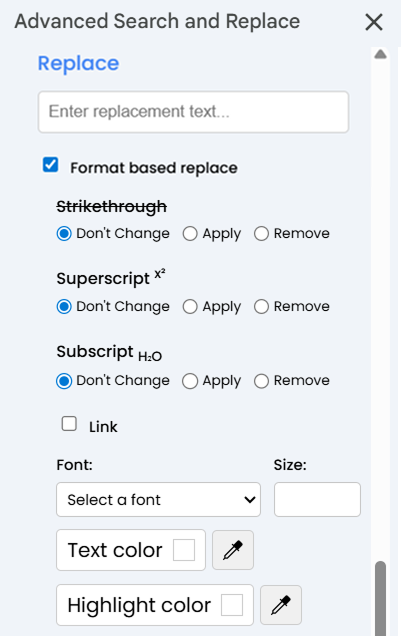
Replace
Replace found text while giving you complete control over formatting. You can choose to replace text in the entire document or just in selected areas. The replace function allows you to keep or change the original formatting, making document editing more flexible and precise.


Why People Choose Us

Advanced Search and Replace overview from add-on store
Advanced Search and Replace for Google Docs™ revolutionizes how you find and modify content in your documents, going far beyond the standard search capabilities. This powerful add-on combines sophisticated text search with format-based criteria to help you locate and transform your content with precision.
Key Features:
– Format-Based Search: Find text with specific formatting attributes like bold, italic, font type, size, color, and more.
– Enhanced Text Search: Use case-sensitive matching and regular expressions for powerful pattern detection.
– Comprehensive Replace: Replace text while preserving or changing formatting, with options to modify text appearance during replacement.
– Multiple Search Logic: Combine text and format criteria for highly specific searches.
– Intuitive Interface: User-friendly sidebar with clear options for both basic and advanced searches.
– Element-Specific Operations: Locate and modify text within paragraphs, lists, tables, and other document elements.
How to Use:
1. Open a Google Docs™ document.
2. Click on “Advanced Search and Replace” in the Add-ons menu.
3. Select “Open Search Panel” to launch the sidebar.
4. Enter your search text and/or select format options.
5. Use the replace functionality to modify your content.
Perfect for writers, editors, and professionals who need precise control over document formatting and content. Whether you’re standardizing documents, fixing formatting inconsistencies, or making bulk changes, Advanced Search and Replace provides the tools you need to work efficiently.
*Google Docs™ is a trademark of Google LLC.